Microsoft Dynamics CRM with Office 365 SharePoint Integration
The SharePoint team is in the process of deploying some new features to the SharePoint Online service The rollout of these new SharePoint Online feat...

The SharePoint team is in the process of deploying some new features to the SharePoint Online service. The rollout of these new SharePoint Online features across the data centers is expected to be completed by end of November.
Most notable from a Microsoft Dynamics CRM perspective, is that Microsoft Dynamics CRM customers can now take advantage of the rich SharePoint Online document management functionality directly within the Microsoft Dynamics CRM application. This provides users the ability to create SharePoint Online Document Libraries dynamically within CRM – when and where they are needed. Companies can add Document Management capabilities to entities such as Accounts, Opportunities, Cases or even custom entities in Microsoft Dynamics CRM.
To take advantage of this functionality follow these easy steps:
- Your Microsoft Dynamics CRM System Administrator must install the Microsoft Dynamics CRM 2011 List Component
- Once enabled, the Microsoft Dynamics CRM user can open an Account
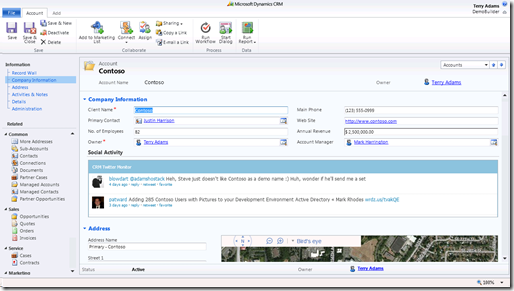
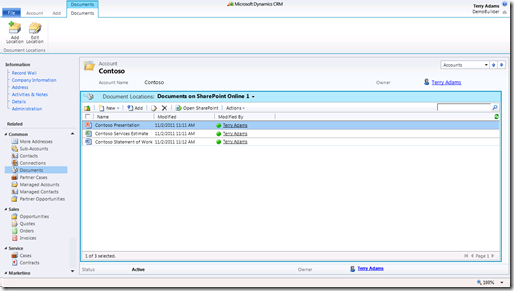
- Click on Documents – If the Account does not have a corresponding Document Library in SharePoint Online one is automatically created
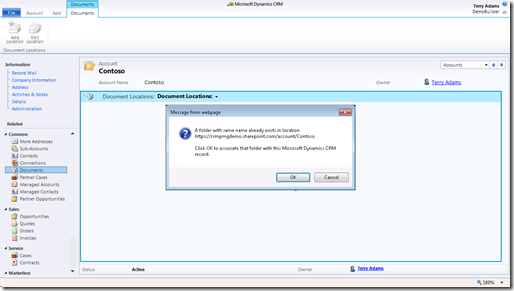
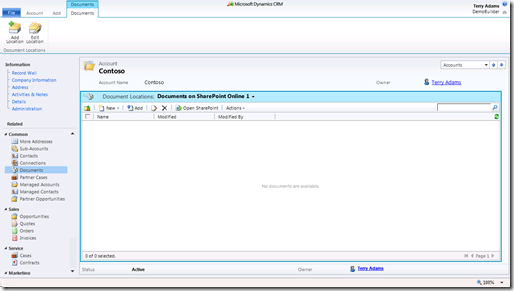
- The SharePoint Online Document Library for this Account is rendered directly with CRM
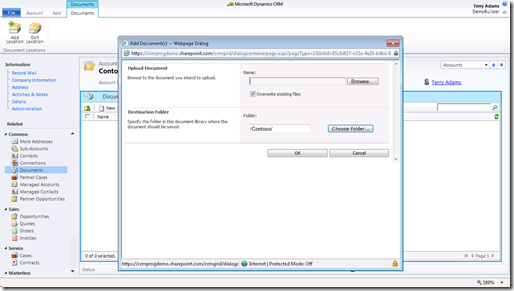
- Users can simply upload content to SharePoint Online while working within Microsoft Dynamics CRM
- Similar to Microsoft Dynamics CRM, SharePoint Online leverages Lync presence to drive individual productivity.
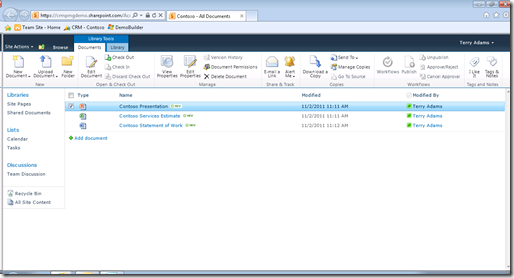
- The corresponding view of the Document Library within SharePoint Online.
For additional technical guidance on how to install the Microsoft Dynamics CRM 2011 List Component see theMicrosoft Dynamics CRM Team blog.
Eric Boocock Senior Technical Product Manager Read more @> https://blogs.msdn.com/b/crm/archive/2011/11/07/microsoft-dynamics-crm-integration-with-sharepoint-online-is-here.aspx