Below is the information needed for auditing success and failure logon events in an ADFS Server Farm (Check out our Identity Cloud Solutions for additional consulting help)
Configure ADFS Event Logging
You can configure event logging on federation servers, federation server proxies, and Web servers. ADFS events are logged in the Application event log and the Security event log.
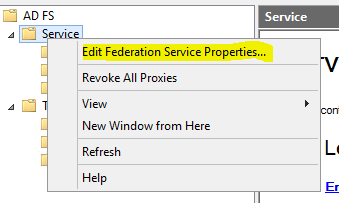
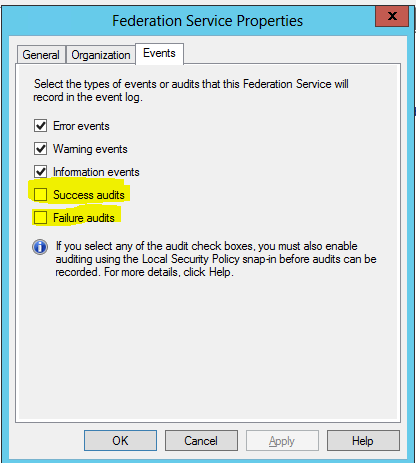
 Important
You must turn on audit object access at each of the federation servers, for ADFS-related audits to appear in the Security log. This will allow the Federation Service to log either success or failure errors. For more information about how to turn on audit object access, see Audit object access (https://go.microsoft.com/fwlink/?LinkId=62686).
Default Events for Claims-aware Applications on a Web Server
You will notice the following event if the ADFS Web server is able to retrieve ADFS trust information successfully from the Federation Service.
Event Type:Information
Event Source:ADFS
Event Category:None
Event ID:621
Date:11/10/2005
Time:4:09:26 PM
User:N/A
Computer:ADFSWEB
Description:
The ADFS Web Agent for claims-aware applications successfully retrieved trust information from the Federation Service.
GUID: d977fee6-175b-4532-bc24-5ac54d137d57
Version: 17
Federation Service Uniform Resource Locator (URL): https://adfsresource.treyresearch.net/adfs/fs/federationserverservice.asmx
Federation Service Uniform Resource Identifier (URI): urn:federation:treyresearch
Federation Service Endpoint URL: https://adfsresource.treyresearch.net/adfs/ls/
Federation Service Domain Account: TREYRESEARCH0ADFSRESOURCE$
You will also see the following event below in the Security log.
Event Type:Success Audit
Event Source:ADFS ASP.NET Module Auditor
Event Category:Object Access
Event ID:560
Date:11/10/2005
Time:4:10:11 PM
User:NT AUTHORITYNETWORK SERVICE
Computer:ADFSWEB
Description:
The client presented a valid inbound token as evidence.
Token ID: _ad5a3694-860d-4063-95a3-3b0163fad3ca
Identity: adamcar@adatum.com
Read more https://technet.microsoft.com/en-us/library/cc738766(v=WS.10).aspx Please check us out for your Managed Service or Cloud Consulting needs.